Best AI Patent Drafting Tools
January 12, 2026

Patent drafting is one of the most demanding parts of the patent lifecycle. Strong claims, a defensible specification, and internal consistency all have to come together under deadline pressure, with little room for error.
Global patent applications climbed 4.9% to 3.7 million, increasing pressure on IP teams to handle more volume without lowering the quality bar. That is driving greater interest in AI patent drafting tools that can accelerate drafting, reduce repetitive work, and support more efficient review.
This guide compares the leading AI patent drafting tools of 2026, where each one fits, where each one falls short, and how to choose the right option for your workflow.
Key Takeaways
- AI patent drafting tools can reduce drafting time by automating repetitive work such as claim structuring, specification generation, and consistency checks.
- The strongest platforms go beyond first-pass drafting to support prosecution workflows, including prior art analysis, amendments, and office action response work.
- Speed alone is not enough. Quality and reliability matter just as much if drafts are going to be accurate, defensible, and ready for attorney review without significant rework.
- The right tool depends on your workflow. Some platforms are built for specific drafting tasks, while others support the broader patent lifecycle in a single environment.
What to Look for in an AI Patent Drafting Tool
The best AI patent drafting tools do more than generate first-pass language. They should support the broader drafting and prosecution workflow while reducing manual work without lowering the quality bar.
Claim Generation, Editing, And Amendment
Look for tools that make claims easy to generate, revise, and amend without breaking hierarchy or structure. The real test is whether attorneys can quickly explore alternative language and fallback positions without creating more cleanup later.
Specification Drafting Aligned With Claim Strategy
Strong tools turn claims into specifications that meaningfully support the intended claim scope. The output should map to embodiments, systems, and methods that reinforce the claims you may later need to defend in prosecution or litigation.
Consistency Checking And Structural Validation
Undefined terms, inconsistentUndefined terms, inconsistent phrasing, and broken dependencies are easy to miss and costly to fix later. Built-in validation helps catch these issues early, reducing avoidable back-and-forth during review.
Office Action And Prosecution Support
Drafting does not end aDrafting does not end at filing. If your team regularly handles office actions, it is worth evaluating whether the platform can also support rejection analysis, amendments, and response drafting.
Collaboration And Version Control
Patent drafting usually iPatent drafting usually involves multiple reviewers and rounds of revision. Look for tools that support redlining, comments, and shared workspaces without creating version confusion.
Security And Enterprise Readiness
Patent work involves sensitive and often confidential information. Security should be a baseline requirement, including standards such as SOC 2 compliance and clear controls over data handling and access.
Looking for a smarter way to manage patent workflows? Explore what Patlytics can do.
The Best AI Patent Drafting Tools
The tools below were selected based on how well they support real-world patent drafting workflows like claim generation, specification alignment, prosecution support, and consistency checking. We also considered factors like workflow integration, collaboration, and security.
1. Patlytics: Best for End Drafting Informed by Prior Art, Claim Construction, and Prosecution History
Patlytics continues to lead the field in 2026 as the most comprehensive AI-powered patent drafting and prosecution platform available. It is the only tool built from the ground up to support end-to-end drafting, prosecution, and strategic analysis in a single environment.
Patlytics is an AI-powered platform that supports the full patent lifecycle, including drafting, prosecution, litigation analysis, and portfolio management. It connects these workflows in a single environment, combining drafting with prior art analysis, invention disclosure forms, office action responses, and invalidity strategy rather than treating them as separate steps.
The platform is designed around attorney-led workflows, with citation-backed outputs, built-in validation, and configurable drafting aligned to each practitioner’s style. This allows teams to scale their work while maintaining the level of precision, consistency, and defensibility required for high-stakes patent matters.

Features:
- Claim generation and editing: Generates and structures independent and dependent claims with support for amendments and iteration
- Specification drafting: Expands claims into detailed specifications aligned with claim scope
- Consistency checks: Flags issues like undefined terms, antecedent basis errors, and dependency inconsistencies
- Draft and analysis integration: Connects drafting with prior art search, infringement analysis, and issue spotting
- Office action support: Assists with summarizing rejections and drafting responses
- Collaboration tools: Enables shared drafting, comments, and version control across teams
- Figures and diagram support: Allows to create figures and diagrams with natural language or hand drawings.
- Security and compliance: SOC 2 Type 2, ISO 27001, ISO 42001, and GDPR, the only patent AI platform with all four. Customer data is segregated and never used to train models.
Pros:
- “Patlytics has transformed how we operate. What used to take weeks now takes days.” - verified review
- “We saw a notable decrease in the time spent on routine drafting tasks. That meant we could focus more on strategy and high-value legal work instead of repetitive writing.” - verified review
Cons:
- “If I have to nitpick, it would be their slightly insistent marketing.” - verified review
Schedule a demo to see how Patlytics can support competitive intelligence, infringement detection, and portfolio-driven IP strategy.
2. Edge: Best For Figure-Heavy Drafting
Edge is a task-based AI patent drafting platform designed to help attorneys and inventors generate patent applications. It focuses on core drafting tasks such as claims, descriptions, and invention disclosures. It also includes tools for parsing inventor materials into structured disclosures to support earlier stages of the drafting process.
Features:
- AI-assisted drafting: Generates claims, descriptions, and background sections
- Figure generation and editing: Creates and edits flow charts, diagrams, and reference elements
- Invention disclosure intake: Parses inventor materials into structured disclosures
- Template customization: Supports customizable drafting styles and templates
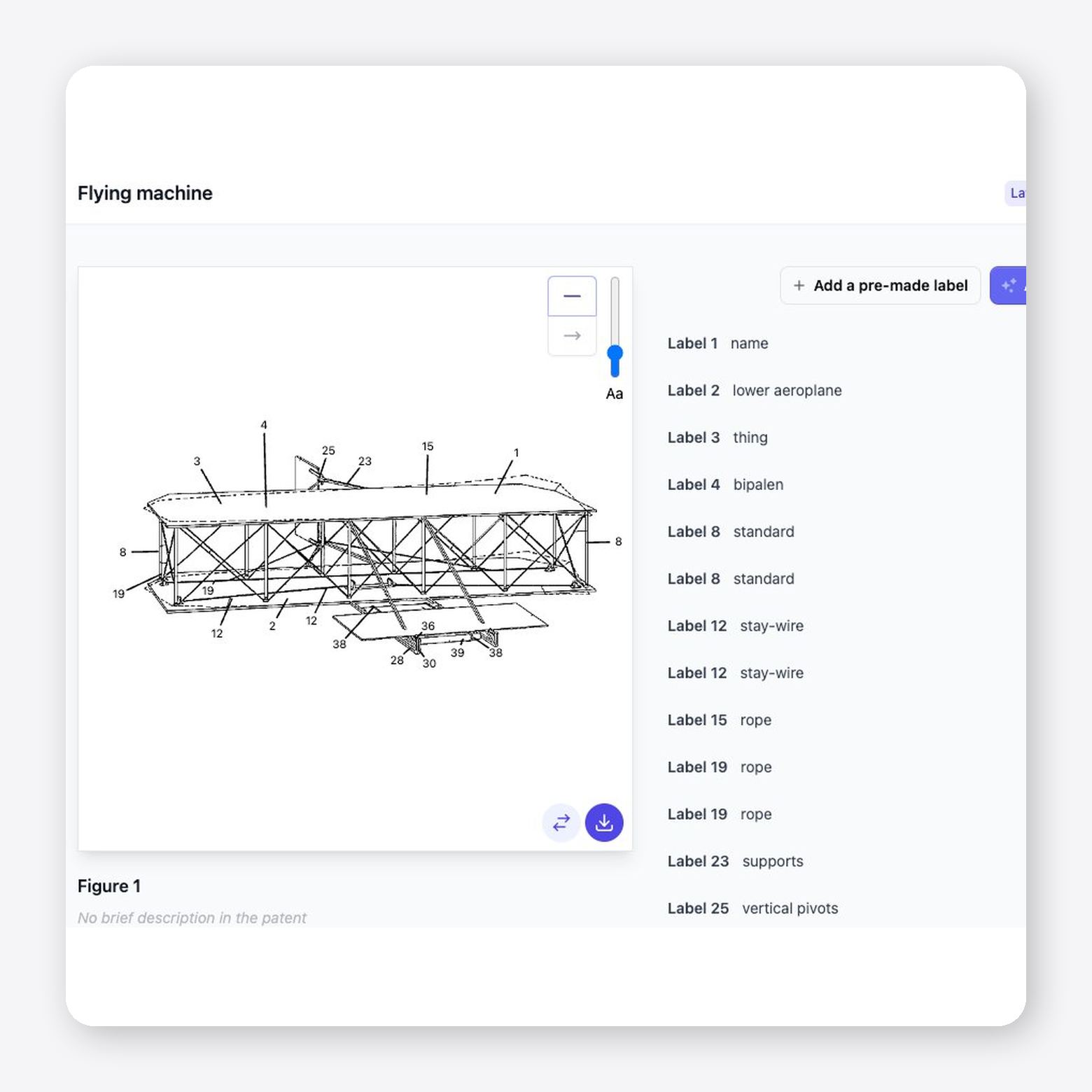
Pros: Strong fit for figure-heavy drafting, with patent-specific tools for diagrams, flow charts, lead lines, and element tracking.
Cons: Limited visible third-party review volume makes independent user validation harder.
3. DeepIP: Best For Microsoft Word-Based Drafting
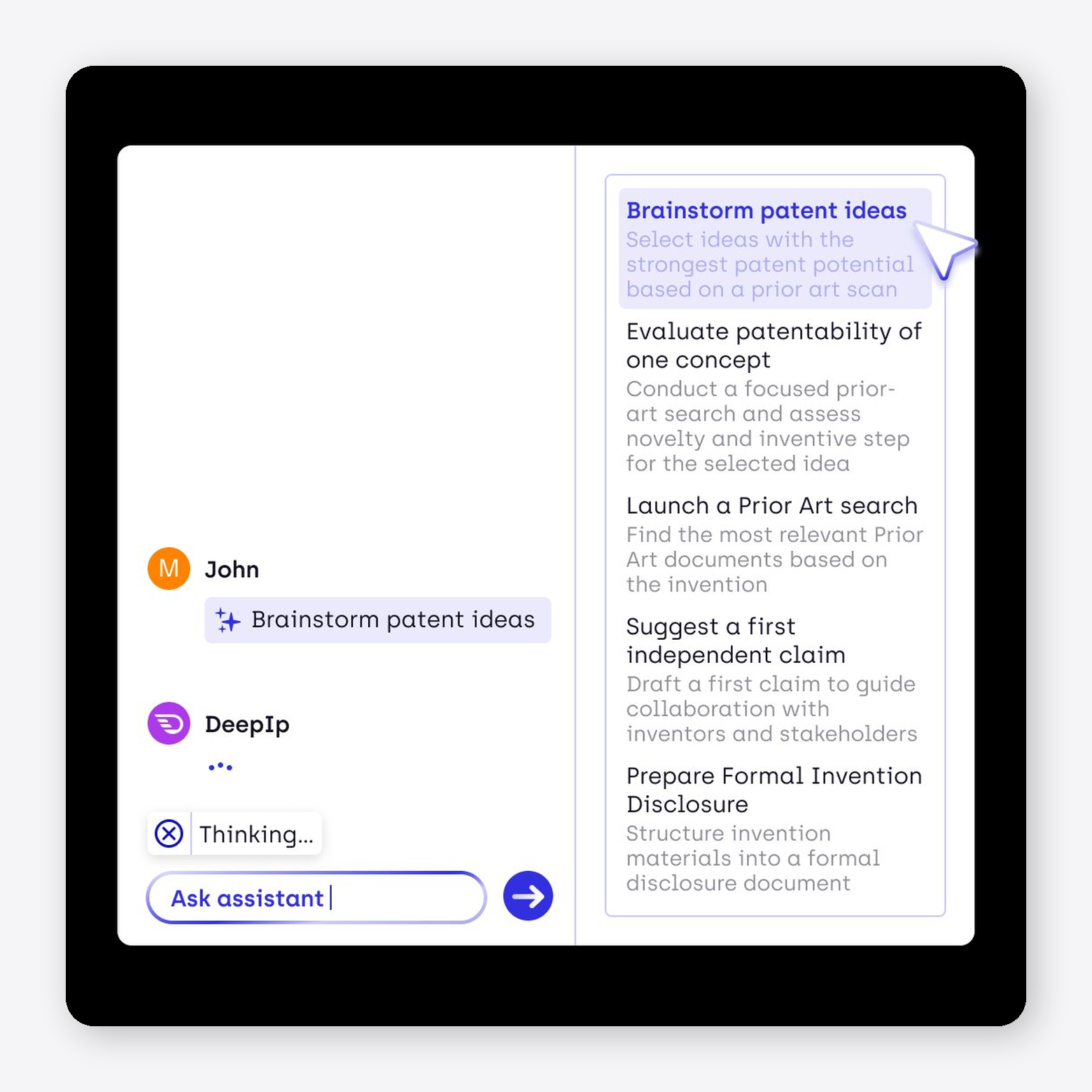
DeepIP is an AI-powered patent assistant that works directly inside Microsoft Word. It positions itself as a drafting and prosecution copilot, combining claim generation, prior art analysis, and office action support. In addition to drafting, DeepIP enables prosecution workflows, including summarizing office actions, analyzing examiner arguments, and mapping claims against cited prior art.
Features:
- Microsoft Word integration: Works as a native add-in within Word for in-place drafting
- AI-assisted drafting: Generates claims and specification content with structured iteration
- Office action analysis: Summarizes rejections and extracts examiner arguments
- Prior art mapping: Compares claims against cited references and highlights overlaps
Pros:
- “DeepIP helps us by taking care of the tedious tasks.” - verified review
- “We really liked the seamless integration within Word.” - verified review
Cons:
- “Custom job creation and template optimization require investment in training time.” - verified review
- “Organizations not using Microsoft Office may find integration challenging. - verified review
4. Solve Intelligence: Best For Office Action-Focused Workflows

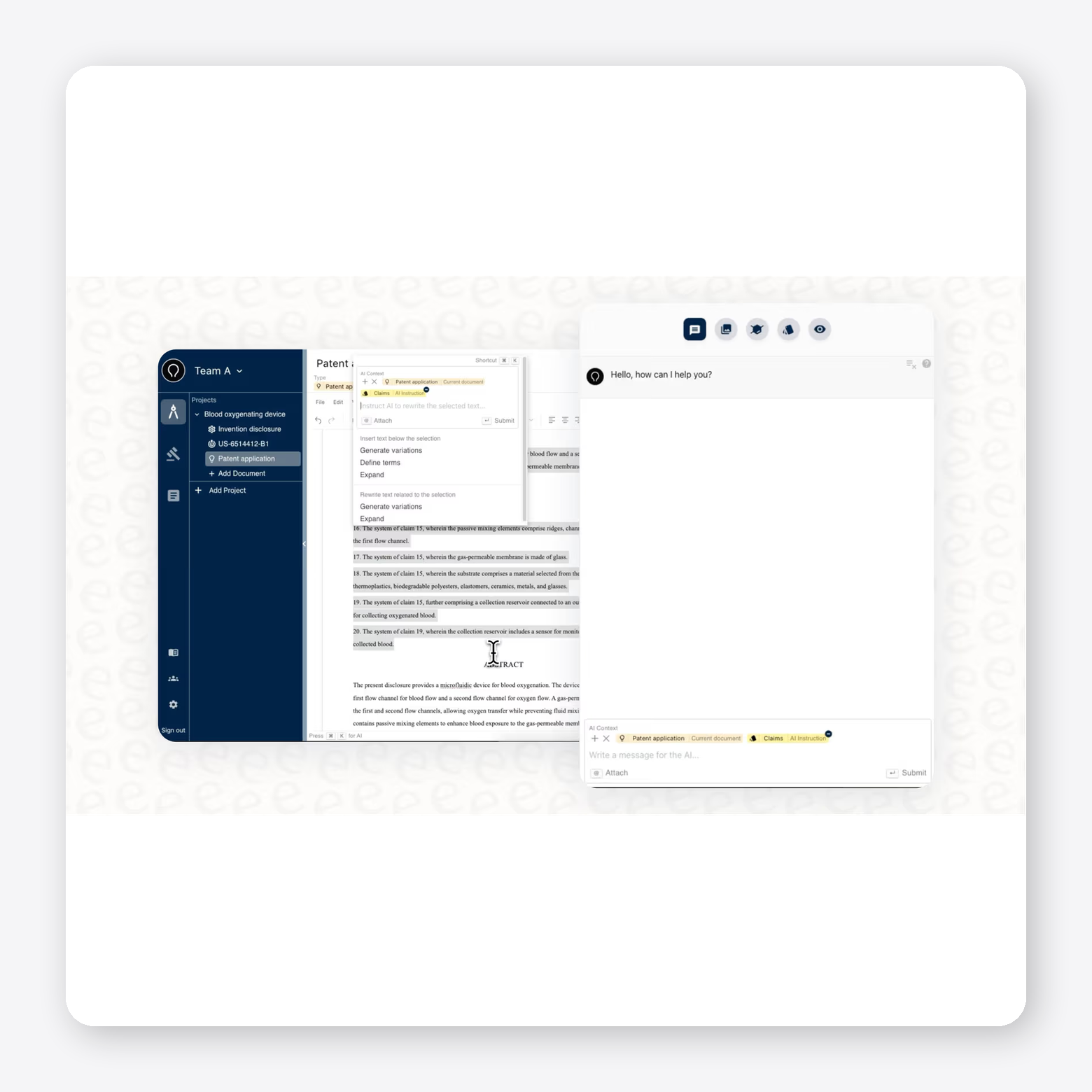
Solve Intelligence is an AI-powered patent drafting platform built around a browser-based document editor. It supports drafting, prosecution, and analysis in a single workspace. It also functions as a drafting copilot that helps generate patent applications from invention disclosures, office action responses, claim amendments, and prior art analysis.
Features:
- AI-assisted drafting: Generates claims and specifications from invention disclosures
- Browser-based editor: Provides a Google Docs–style drafting environment
- Office action support: Analyzes rejections and drafts response frameworks with citations
- Claim amendment suggestions: Proposes revisions aligned with examiner feedback
Pros:
- “I like that Solve Intelligence Patent Copilot aids in the drafting process by automating mundane aspects and adding depth to the disclosure.” - verified review
Cons:
- “We found the software less efficient when working on mechanical inventions.” - verified review
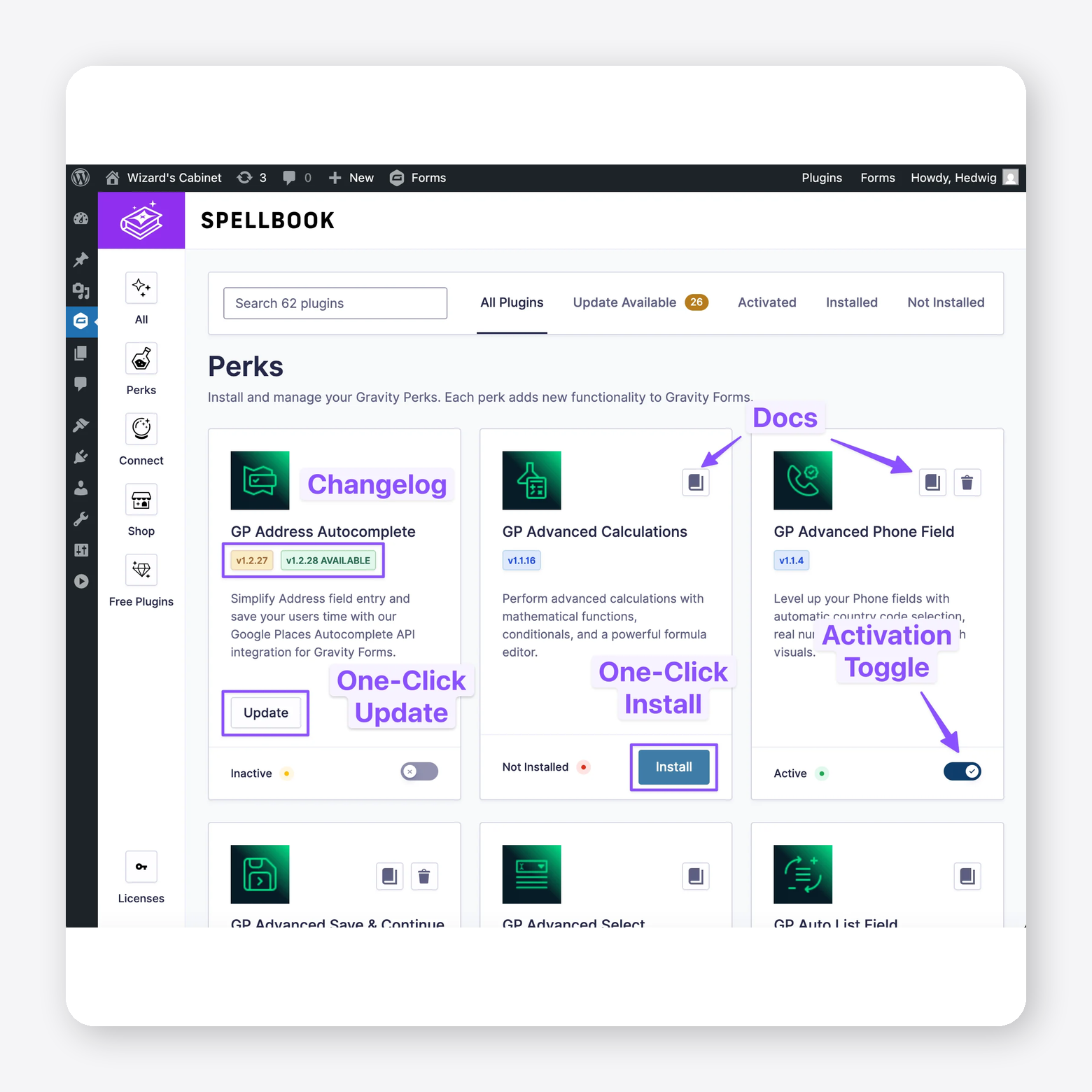
5. Spellbook: Best For Contract Review Within Microsoft Word

Spellbook is a legal AI assistant designed primarily for contract drafting and review, operating directly inside Microsoft Word. It focuses on helping legal teams draft, redline, and analyze contracts without leaving their existing document workflow, using AI to suggest language, flag risks, and answer questions in context. It also includes tools for adapting language to firm-specific styles and benchmarking contracts against standard terms
Features:
- Microsoft Word integration: Works directly inside Word for drafting, redlining, and review
- AI contract drafting: Suggests clauses and generates contract language based on context
- Risk identification: Flags missing clauses, aggressive terms, and potential issues
- Redlining and review: Adds comments and edits directly within documents
Pros:
- “You never leave the document you’re working on, which keeps the process comfortable and familiar.” - verified review
Cons:
- “Everything happens inside Word, which can feel limiting if your team prefers browser-based tools or more flexible workflows.” - verified review
6. Powerpatent: Best For Structured Invention Capture
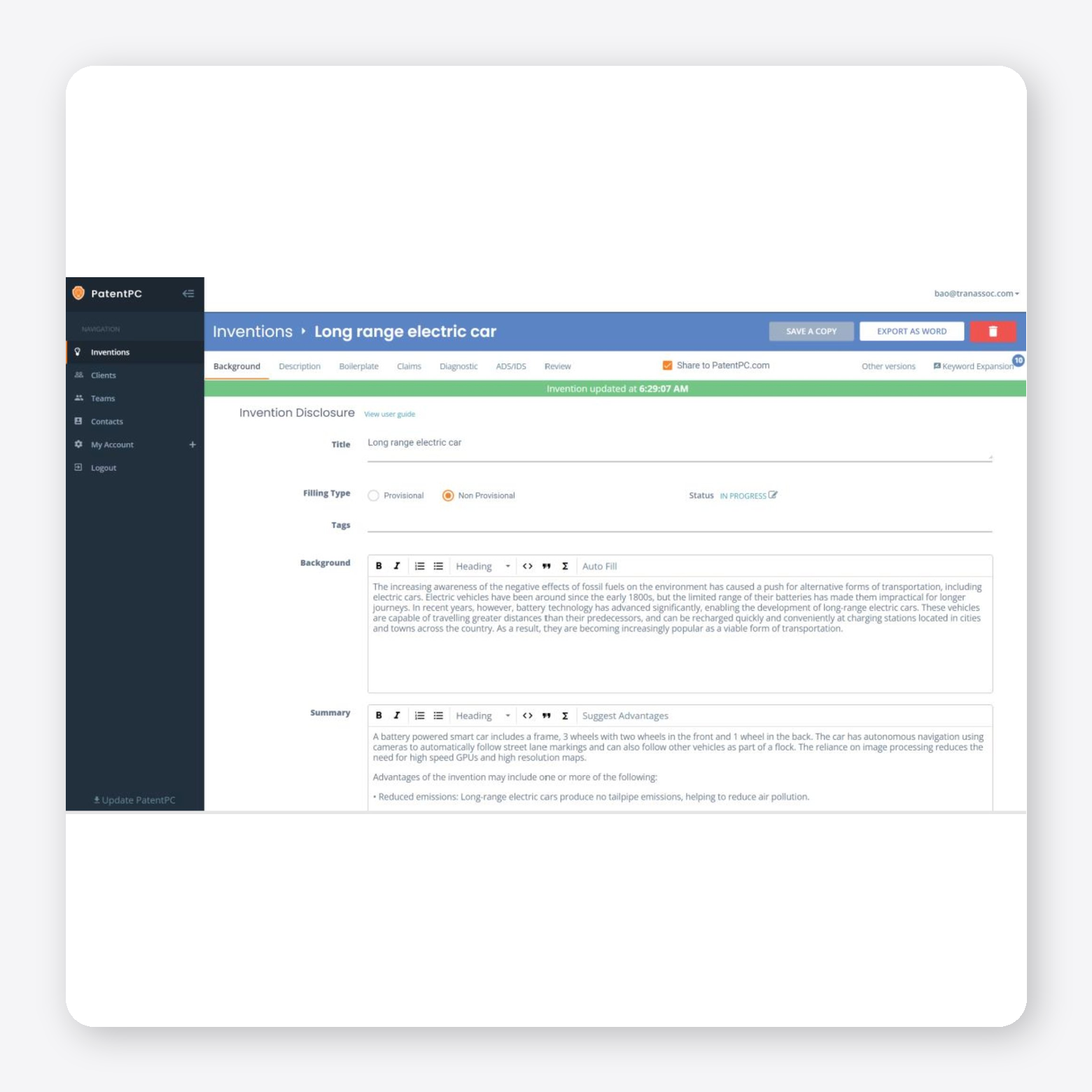
PowerPatent supports patent drafting with AI and turns invention disclosures into structured patent applications. It guides users through capturing technical inputs such as summaries, claims, and figure annotations and generates first-pass drafts based on that information. It also includes tools for consistency checking and collaborative review.
Features:
- AI draft generation: Produces full patent drafts from invention summaries and inputs
- Structured disclosure capture: Guides users through invention inputs and drafting prompts
- Specification and claim generation: Creates detailed descriptions and claims from disclosures
- Consistency checks: Identifies structural and quality issues during drafting
Pros: Structured invention capture and guided drafting may be useful for teams that want a more organized path from disclosure to first draft.
Cons: Public third-party review volume appears limited, making it harder to assess real-world user satisfaction.
7. Claimmaster: Best For Patent Proofreading In Microsoft Word

ClaimMaster is a patent drafting and proofreading tool built as a Microsoft Word add-in that supports attorneys review and validates patent applications and office action responses. It focuses on automating error detection and consistency checks across claims, specifications, and supporting documents. In addition to proofreading, the platform includes tools for drafting assistance, document automation, and office action workflows, such as generating response shells and managing USPTO forms.
Features:
- Microsoft Word integration: Works as an add-in within Word for drafting and review
- Automated proofreading: Detects issues like antecedent basis errors, claim dependencies, and inconsistencies
- Drafting tools: Generates sections such as summaries, figures, and structured content from claims
- Office action support: Creates response shells and analyzes office actions

Pros:
- “Makes me look good when I can produce visualizations or claim charts flexibly and easily.” - verified review
Cons:
- “I don't like this program slowing down and crashing MS word.” - verified review
What Redditors Say About the Best Patent Drafting Software
Across practitioner discussions, the same pattern appears repeatedly: AI tools can be useful for early-stage drafting, especially for generating first-pass structure and reducing repetitive work. They are often seen as most helpful for turning claims, notes, or disclosures into a rough application draft more quickly.
At the same time, skepticism around output quality remains strong. Practitioners frequently describe AI-generated drafts as too generic, inconsistent, or still requiring substantial attorney review and rewriting.
There is also debate about overall value. Some practitioners believe dedicated patent tools do not always outperform general-purpose models, while others see clear long-term potential if these platforms improve in technical nuance, patent-specific structure, and reliability.
Choose an AI Drafting Platform That Supports Better Patent Outcomes
The right AI patent drafting tool depends on where your team needs the most support. For some teams, the priority is moving faster on first-pass drafts. For others, it is maintaining consistency, supporting amendments, and reducing review burden across prosecution.
Patlytics is best suited for teams that want drafting, prosecution, and analysis in a single platform rather than across multiple point solutions. It supports claim drafting, specification development, office action response work, invalidity analysis, and collaboration in one workflow, while keeping attorney review and judgment central.
Teams looking for broader lifecycle support may want to evaluate whether that kind of end-to-end platform fits their process.
Ready to take the next step? Book a demo to see Patlytics in action.
Best AI patent drafting FAQs
What Is The Best AI Patent Drafting Tool In 2026?
There isn’t a single “best” tool for every team. The right choice depends on how much of your drafting and prosecution workflow you want the platform to support and how well it fits into your existing process.
For teams looking for a more complete, end-to-end solution, it’s worth prioritizing platforms that offer:
- Claim generation and amendment support with structured hierarchy
- Specification drafting that aligns directly with claim strategy
- Built-in consistency checks (e.g., antecedent basis, undefined terms, dependencies)
- Office action and prosecution support, including response drafting and iteration
- Collaboration features like redlining, comments, and version control
- Enterprise-grade security and clear data handling policies
For example, Patlytics combines these capabilities in a single environment and can reduce handoffs, improve consistency, and make it easier to manage higher drafting volume without adding complexity. It is also the only AI patent drafting tool combining all of these capabilities in one environment, with the added advantage that drafts are informed by live prior art analysis, claim construction, and prosecution history, context drafting-only tools don't have access to. It's used by 40% of the Am Law 100 (including Quinn Emanuel, and Foley & Lardner) and Fortune 500 IP teams at Sanofi, Rivian, GRAIL, Asahi Kasei, and Panasonic. Customers report consolidating 4–5 point tools into the platform and meaningful reductions in iteration cycles on drafting work.
How Does AI improve Patent Drafting And Prosecution Efficiency?
AI reduces time spent on repetitive drafting tasks like generating claims, formatting specifications, and checking for structural issues. It can also surface problems earlier such as inconsistencies or missing support before they slow down review or prosecution. This allows attorneys to spend more time on claim strategy and legal judgment rather than manual drafting work.
Can AI Drafting Tools Support Litigation And Invalidity Strategy?
Yes, some AI patent tools, like Patlytics, extend beyond drafting to support litigation and invalidity workflows. This can include prior art analysis, claim charting, and identifying potential weaknesses in claim scope. For teams involved in both prosecution and disputes, these capabilities can help connect early drafting decisions with downstream strategy.

Best AI Patent Drafting Tools
Patent drafting is one of the most demanding parts of the patent lifecycle. Strong claims, a defensible specification, and internal consistency all have to come together under deadline pressure, with little room for error.
Global patent applications climbed 4.9% to 3.7 million, increasing pressure on IP teams to handle more volume without lowering the quality bar. That is driving greater interest in AI patent drafting tools that can accelerate drafting, reduce repetitive work, and support more efficient review.
This guide compares the leading AI patent drafting tools of 2026, where each one fits, where each one falls short, and how to choose the right option for your workflow.
Key Takeaways
- AI patent drafting tools can reduce drafting time by automating repetitive work such as claim structuring, specification generation, and consistency checks.
- The strongest platforms go beyond first-pass drafting to support prosecution workflows, including prior art analysis, amendments, and office action response work.
- Speed alone is not enough. Quality and reliability matter just as much if drafts are going to be accurate, defensible, and ready for attorney review without significant rework.
- The right tool depends on your workflow. Some platforms are built for specific drafting tasks, while others support the broader patent lifecycle in a single environment.
What to Look for in an AI Patent Drafting Tool
The best AI patent drafting tools do more than generate first-pass language. They should support the broader drafting and prosecution workflow while reducing manual work without lowering the quality bar.
Claim Generation, Editing, And Amendment
Look for tools that make claims easy to generate, revise, and amend without breaking hierarchy or structure. The real test is whether attorneys can quickly explore alternative language and fallback positions without creating more cleanup later.
Specification Drafting Aligned With Claim Strategy
Strong tools turn claims into specifications that meaningfully support the intended claim scope. The output should map to embodiments, systems, and methods that reinforce the claims you may later need to defend in prosecution or litigation.
Consistency Checking And Structural Validation
Undefined terms, inconsistentUndefined terms, inconsistent phrasing, and broken dependencies are easy to miss and costly to fix later. Built-in validation helps catch these issues early, reducing avoidable back-and-forth during review.
Office Action And Prosecution Support
Drafting does not end aDrafting does not end at filing. If your team regularly handles office actions, it is worth evaluating whether the platform can also support rejection analysis, amendments, and response drafting.
Collaboration And Version Control
Patent drafting usually iPatent drafting usually involves multiple reviewers and rounds of revision. Look for tools that support redlining, comments, and shared workspaces without creating version confusion.
Security And Enterprise Readiness
Patent work involves sensitive and often confidential information. Security should be a baseline requirement, including standards such as SOC 2 compliance and clear controls over data handling and access.
Looking for a smarter way to manage patent workflows? Explore what Patlytics can do.
The Best AI Patent Drafting Tools
The tools below were selected based on how well they support real-world patent drafting workflows like claim generation, specification alignment, prosecution support, and consistency checking. We also considered factors like workflow integration, collaboration, and security.
1. Patlytics: Best for End Drafting Informed by Prior Art, Claim Construction, and Prosecution History
Patlytics continues to lead the field in 2026 as the most comprehensive AI-powered patent drafting and prosecution platform available. It is the only tool built from the ground up to support end-to-end drafting, prosecution, and strategic analysis in a single environment.
Patlytics is an AI-powered platform that supports the full patent lifecycle, including drafting, prosecution, litigation analysis, and portfolio management. It connects these workflows in a single environment, combining drafting with prior art analysis, invention disclosure forms, office action responses, and invalidity strategy rather than treating them as separate steps.
The platform is designed around attorney-led workflows, with citation-backed outputs, built-in validation, and configurable drafting aligned to each practitioner’s style. This allows teams to scale their work while maintaining the level of precision, consistency, and defensibility required for high-stakes patent matters.
Features:
- Claim generation and editing: Generates and structures independent and dependent claims with support for amendments and iteration
- Specification drafting: Expands claims into detailed specifications aligned with claim scope
- Consistency checks: Flags issues like undefined terms, antecedent basis errors, and dependency inconsistencies
- Draft and analysis integration: Connects drafting with prior art search, infringement analysis, and issue spotting
- Office action support: Assists with summarizing rejections and drafting responses
- Collaboration tools: Enables shared drafting, comments, and version control across teams
- Figures and diagram support: Allows to create figures and diagrams with natural language or hand drawings.
- Security and compliance: SOC 2 Type 2, ISO 27001, ISO 42001, and GDPR, the only patent AI platform with all four. Customer data is segregated and never used to train models.
Pros:
- “Patlytics has transformed how we operate. What used to take weeks now takes days.” - verified review
- “We saw a notable decrease in the time spent on routine drafting tasks. That meant we could focus more on strategy and high-value legal work instead of repetitive writing.” - verified review
Cons:
- “If I have to nitpick, it would be their slightly insistent marketing.” - verified review
Schedule a demo to see how Patlytics can support competitive intelligence, infringement detection, and portfolio-driven IP strategy.
2. Edge: Best For Figure-Heavy Drafting
Edge is a task-based AI patent drafting platform designed to help attorneys and inventors generate patent applications. It focuses on core drafting tasks such as claims, descriptions, and invention disclosures. It also includes tools for parsing inventor materials into structured disclosures to support earlier stages of the drafting process.
Features:
- AI-assisted drafting: Generates claims, descriptions, and background sections
- Figure generation and editing: Creates and edits flow charts, diagrams, and reference elements
- Invention disclosure intake: Parses inventor materials into structured disclosures
- Template customization: Supports customizable drafting styles and templates
Pros: Strong fit for figure-heavy drafting, with patent-specific tools for diagrams, flow charts, lead lines, and element tracking.
Cons: Limited visible third-party review volume makes independent user validation harder.
3. DeepIP: Best For Microsoft Word-Based Drafting
DeepIP is an AI-powered patent assistant that works directly inside Microsoft Word. It positions itself as a drafting and prosecution copilot, combining claim generation, prior art analysis, and office action support. In addition to drafting, DeepIP enables prosecution workflows, including summarizing office actions, analyzing examiner arguments, and mapping claims against cited prior art.
Features:
- Microsoft Word integration: Works as a native add-in within Word for in-place drafting
- AI-assisted drafting: Generates claims and specification content with structured iteration
- Office action analysis: Summarizes rejections and extracts examiner arguments
- Prior art mapping: Compares claims against cited references and highlights overlaps
Pros:
- “DeepIP helps us by taking care of the tedious tasks.” - verified review
- “We really liked the seamless integration within Word.” - verified review
Cons:
- “Custom job creation and template optimization require investment in training time.” - verified review
- “Organizations not using Microsoft Office may find integration challenging. - verified review
4. Solve Intelligence: Best For Office Action-Focused Workflows
Solve Intelligence is an AI-powered patent drafting platform built around a browser-based document editor. It supports drafting, prosecution, and analysis in a single workspace. It also functions as a drafting copilot that helps generate patent applications from invention disclosures, office action responses, claim amendments, and prior art analysis.
Features:
- AI-assisted drafting: Generates claims and specifications from invention disclosures
- Browser-based editor: Provides a Google Docs–style drafting environment
- Office action support: Analyzes rejections and drafts response frameworks with citations
- Claim amendment suggestions: Proposes revisions aligned with examiner feedback
Pros:
- “I like that Solve Intelligence Patent Copilot aids in the drafting process by automating mundane aspects and adding depth to the disclosure.” - verified review
Cons:
- “We found the software less efficient when working on mechanical inventions.” - verified review
5. Spellbook: Best For Contract Review Within Microsoft Word
Spellbook is a legal AI assistant designed primarily for contract drafting and review, operating directly inside Microsoft Word. It focuses on helping legal teams draft, redline, and analyze contracts without leaving their existing document workflow, using AI to suggest language, flag risks, and answer questions in context. It also includes tools for adapting language to firm-specific styles and benchmarking contracts against standard terms
Features:
- Microsoft Word integration: Works directly inside Word for drafting, redlining, and review
- AI contract drafting: Suggests clauses and generates contract language based on context
- Risk identification: Flags missing clauses, aggressive terms, and potential issues
- Redlining and review: Adds comments and edits directly within documents
Pros:
- “You never leave the document you’re working on, which keeps the process comfortable and familiar.” - verified review
Cons:
- “Everything happens inside Word, which can feel limiting if your team prefers browser-based tools or more flexible workflows.” - verified review
6. Powerpatent: Best For Structured Invention Capture
PowerPatent supports patent drafting with AI and turns invention disclosures into structured patent applications. It guides users through capturing technical inputs such as summaries, claims, and figure annotations and generates first-pass drafts based on that information. It also includes tools for consistency checking and collaborative review.
Features:
- AI draft generation: Produces full patent drafts from invention summaries and inputs
- Structured disclosure capture: Guides users through invention inputs and drafting prompts
- Specification and claim generation: Creates detailed descriptions and claims from disclosures
- Consistency checks: Identifies structural and quality issues during drafting
Pros: Structured invention capture and guided drafting may be useful for teams that want a more organized path from disclosure to first draft.
Cons: Public third-party review volume appears limited, making it harder to assess real-world user satisfaction.
7. Claimmaster: Best For Patent Proofreading In Microsoft Word
ClaimMaster is a patent drafting and proofreading tool built as a Microsoft Word add-in that supports attorneys review and validates patent applications and office action responses. It focuses on automating error detection and consistency checks across claims, specifications, and supporting documents. In addition to proofreading, the platform includes tools for drafting assistance, document automation, and office action workflows, such as generating response shells and managing USPTO forms.
Features:
- Microsoft Word integration: Works as an add-in within Word for drafting and review
- Automated proofreading: Detects issues like antecedent basis errors, claim dependencies, and inconsistencies
- Drafting tools: Generates sections such as summaries, figures, and structured content from claims
- Office action support: Creates response shells and analyzes office actions
Pros:
- “Makes me look good when I can produce visualizations or claim charts flexibly and easily.” - verified review
Cons:
- “I don't like this program slowing down and crashing MS word.” - verified review
What Redditors Say About the Best Patent Drafting Software
Across practitioner discussions, the same pattern appears repeatedly: AI tools can be useful for early-stage drafting, especially for generating first-pass structure and reducing repetitive work. They are often seen as most helpful for turning claims, notes, or disclosures into a rough application draft more quickly.
At the same time, skepticism around output quality remains strong. Practitioners frequently describe AI-generated drafts as too generic, inconsistent, or still requiring substantial attorney review and rewriting.
There is also debate about overall value. Some practitioners believe dedicated patent tools do not always outperform general-purpose models, while others see clear long-term potential if these platforms improve in technical nuance, patent-specific structure, and reliability.
Choose an AI Drafting Platform That Supports Better Patent Outcomes
The right AI patent drafting tool depends on where your team needs the most support. For some teams, the priority is moving faster on first-pass drafts. For others, it is maintaining consistency, supporting amendments, and reducing review burden across prosecution.
Patlytics is best suited for teams that want drafting, prosecution, and analysis in a single platform rather than across multiple point solutions. It supports claim drafting, specification development, office action response work, invalidity analysis, and collaboration in one workflow, while keeping attorney review and judgment central.
Teams looking for broader lifecycle support may want to evaluate whether that kind of end-to-end platform fits their process.
Ready to take the next step? Book a demo to see Patlytics in action.
Best AI patent drafting FAQs
What Is The Best AI Patent Drafting Tool In 2026?
There isn’t a single “best” tool for every team. The right choice depends on how much of your drafting and prosecution workflow you want the platform to support and how well it fits into your existing process.
For teams looking for a more complete, end-to-end solution, it’s worth prioritizing platforms that offer:
- Claim generation and amendment support with structured hierarchy
- Specification drafting that aligns directly with claim strategy
- Built-in consistency checks (e.g., antecedent basis, undefined terms, dependencies)
- Office action and prosecution support, including response drafting and iteration
- Collaboration features like redlining, comments, and version control
- Enterprise-grade security and clear data handling policies
For example, Patlytics combines these capabilities in a single environment and can reduce handoffs, improve consistency, and make it easier to manage higher drafting volume without adding complexity. It is also the only AI patent drafting tool combining all of these capabilities in one environment, with the added advantage that drafts are informed by live prior art analysis, claim construction, and prosecution history, context drafting-only tools don't have access to. It's used by 40% of the Am Law 100 (including Quinn Emanuel, and Foley & Lardner) and Fortune 500 IP teams at Sanofi, Rivian, GRAIL, Asahi Kasei, and Panasonic. Customers report consolidating 4–5 point tools into the platform and meaningful reductions in iteration cycles on drafting work.
How Does AI improve Patent Drafting And Prosecution Efficiency?
AI reduces time spent on repetitive drafting tasks like generating claims, formatting specifications, and checking for structural issues. It can also surface problems earlier such as inconsistencies or missing support before they slow down review or prosecution. This allows attorneys to spend more time on claim strategy and legal judgment rather than manual drafting work.
Can AI Drafting Tools Support Litigation And Invalidity Strategy?
Yes, some AI patent tools, like Patlytics, extend beyond drafting to support litigation and invalidity workflows. This can include prior art analysis, claim charting, and identifying potential weaknesses in claim scope. For teams involved in both prosecution and disputes, these capabilities can help connect early drafting decisions with downstream strategy.
The Premier AI-Powered Patent Platform
Reduce cycle times. Increase margins. Deliver winning IP outcomes.
Book a DemoThe Premier AI-Powered
Patent Platform
Reduce cycle times. Increase margins. Deliver winning IP outcomes.