AI Office Action Response Tools: What Patent Attorneys Should Actually Look For
September 4, 2026

Office action responses involve more than drafting. Patent attorneys must interpret rejections, analyze cited prior art, and develop a response strategy. The best AI office action response tools reduce manual analysis while allowing attorneys to retain control over legal judgment.
Global patent applications reached 3.7 million in 2024, a 4.9% increase over the previous year, according to WIPO. As filing volume grows, patent attorneys spend more time reviewing examiner reasoning, mapping claims to cited references, and identifying specification support before drafting begins.
This guide explains how AI office action response tools work. It compares the leading platforms and outlines the capabilities that matter most during software evaluation.
Key Takeaways
- AI office action response tools automate tasks such as rejection analysis, prior art retrieval, claim mapping, and response drafting.
- The best platforms support attorney review with citation-backed arguments and specification references rather than replacing legal judgment.
- Specialized patent AI platforms generally provide more reliable prosecution support than general-purpose AI tools.
- Office action response tools vary in scope, with some focusing on prosecution and others supporting the broader patent lifecycle.
What Does an Office Action Response Tool Do?
An AI office action response tool helps patent attorneys analyze and respond to patent examiner rejections. It automates much of the manual work before drafting begins, including parsing office actions, retrieving cited prior art, mapping claims, and preparing a response draft for attorney review.
Step 1: OA Parsing
The software ingests the office action PDF and identifies each rejection under 35 U.S.C. §§ 101, 102, 103, and 112. It extracts the examiner's arguments and links them to the relevant claims.
Step 2: Prior Art Retrieval
Next, it retrieves the cited references from the USPTO and other patent databases. It also highlights the passages the examiner relied on for each rejection.
Step 3: Claim-to-reference Mapping
Each claim limitation is mapped against the cited references. This analysis shows where the examiner identified a teaching and where the cited art may not support the rejection.
Step 4: Argument and Amendment Suggestions
Based on the analysis, the software generates draft arguments that distinguish the claims from the cited prior art. It also identifies amendment options and cites supporting passages from the specification.
Step 5: Response Document Assembly
Finally, it assembles a draft response with remarks, claim amendments, and an updated claim listing. The document follows applicable 37 CFR requirements and is ready for attorney review and revision.
Leading AI Office Action Response Tools in 2026
AI office action response tools vary in scope and functionality. Some focus on prosecution workflows, while others combine office action analysis with drafting, search, and broader patent lifecycle management. The platforms below compare their core capabilities, strengths, and tradeoffs for patent attorneys and in-house IP teams.
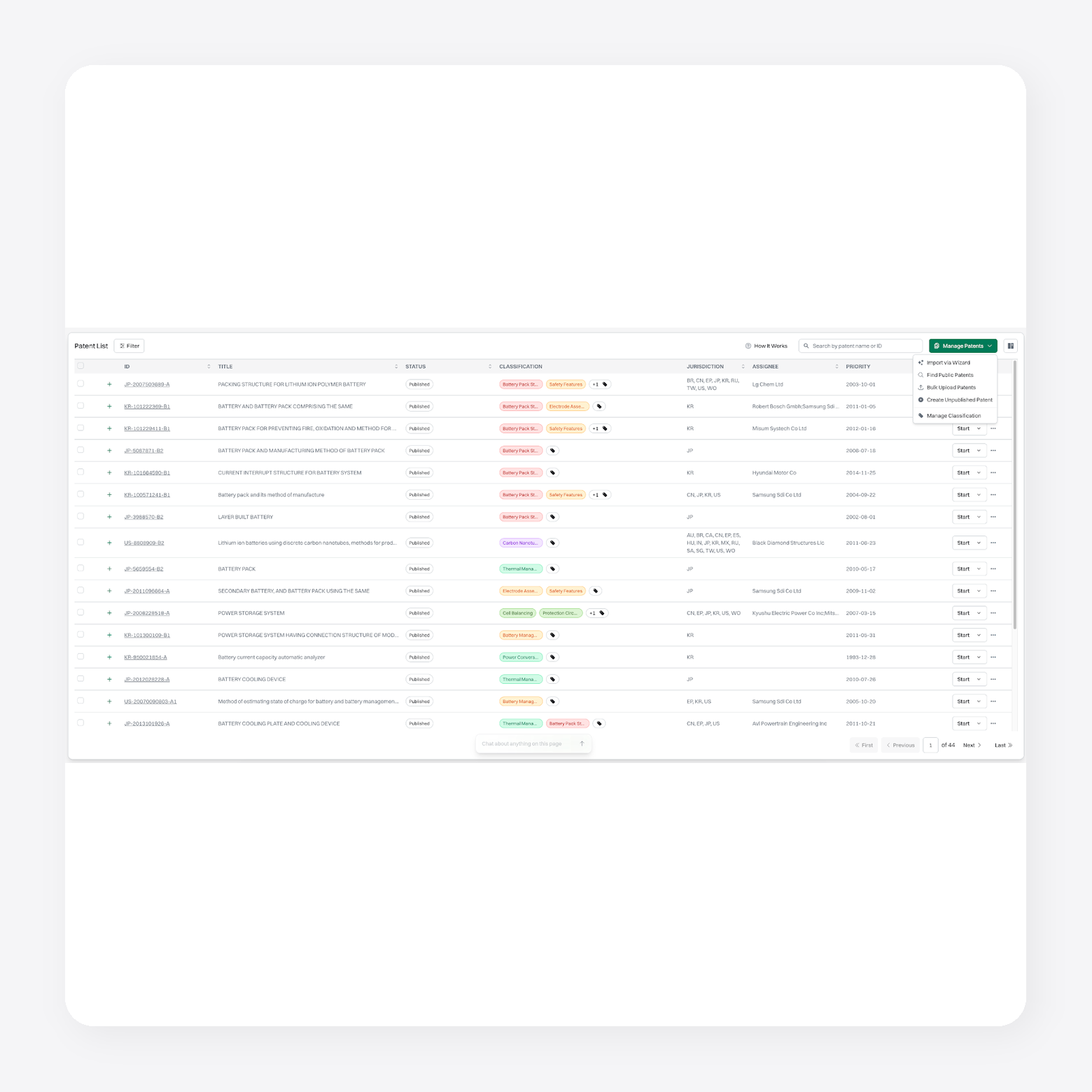
1. Patlytics: Best For End-To-End Patent Lifecycle Management

Patlytics is an AI-native patent platform that supports the entire patent lifecycle, from invention disclosure and drafting to prosecution, invalidity analysis, infringement detection, and portfolio management.
The platform is built to reduce repetitive work while improving the quality and usability of the output. Teams can move from source materials to structured drafts, analyze prior art, generate claim charts, and evaluate portfolio assets without switching systems or losing context. That makes it easier to move faster across high-volume work while keeping attorney review and judgment central.
Patlytics is trusted by large law firms and enterprise teams, including over 40% of Am Law 100 firms and Fortune 500. It is the only platform on the market combining drafting, prosecution, infringement, invalidity, FTO, SEP, and portfolio analysis in one system.
Features
- AI-powered office action analysis: Retrieves office action materials, analyzes examiner rejections, recommends response strategies, and drafts responses with a contextual AI agent.
- Patent application drafting: Generates applications from invention disclosures, technical documents, figures, and other source materials.
- Invalidity analysis: Combines prior art search, §§ 102, 103, and 112 analysis, and citation-backed claim charting in one workflow.
- Infringement detection: Identifies evidence of use, generates limitation-by-limitation claim charts, and analyzes portfolios at scale.
- Connected patent workflows: Moves seamlessly between drafting, prosecution, search, invalidity, FTO, and portfolio analysis within one platform.
- Enterprise security: SOC 2 Type II, ISO 27001, ISO 42001, and GDPR compliant. Customer data is encrypted, segregated, and never used to train AI models.
Pros
- User-friendly interface that delivers accurate, reliable outputs across key patent categories
- Single platform that covers drafting, analysis, infringement detection, and portfolio management without switching tools
- Responsive customer support that users consistently describe as trustworthy and attentive
Cons:
- Built for teams whose work spans multiple IP workflows, solo practitioners with a single narrow focus may prefer a point tool
Customer reviews
- "Patlytics is easy to use, understand, and helps our team see issues that they would normally miss. The Patlytics team and customer service is top notch and gives us the trust that we need in a product this important to our bottom line." — Verified user, G2
Pricing: Custom pricing
Book a demo with Patlytics today
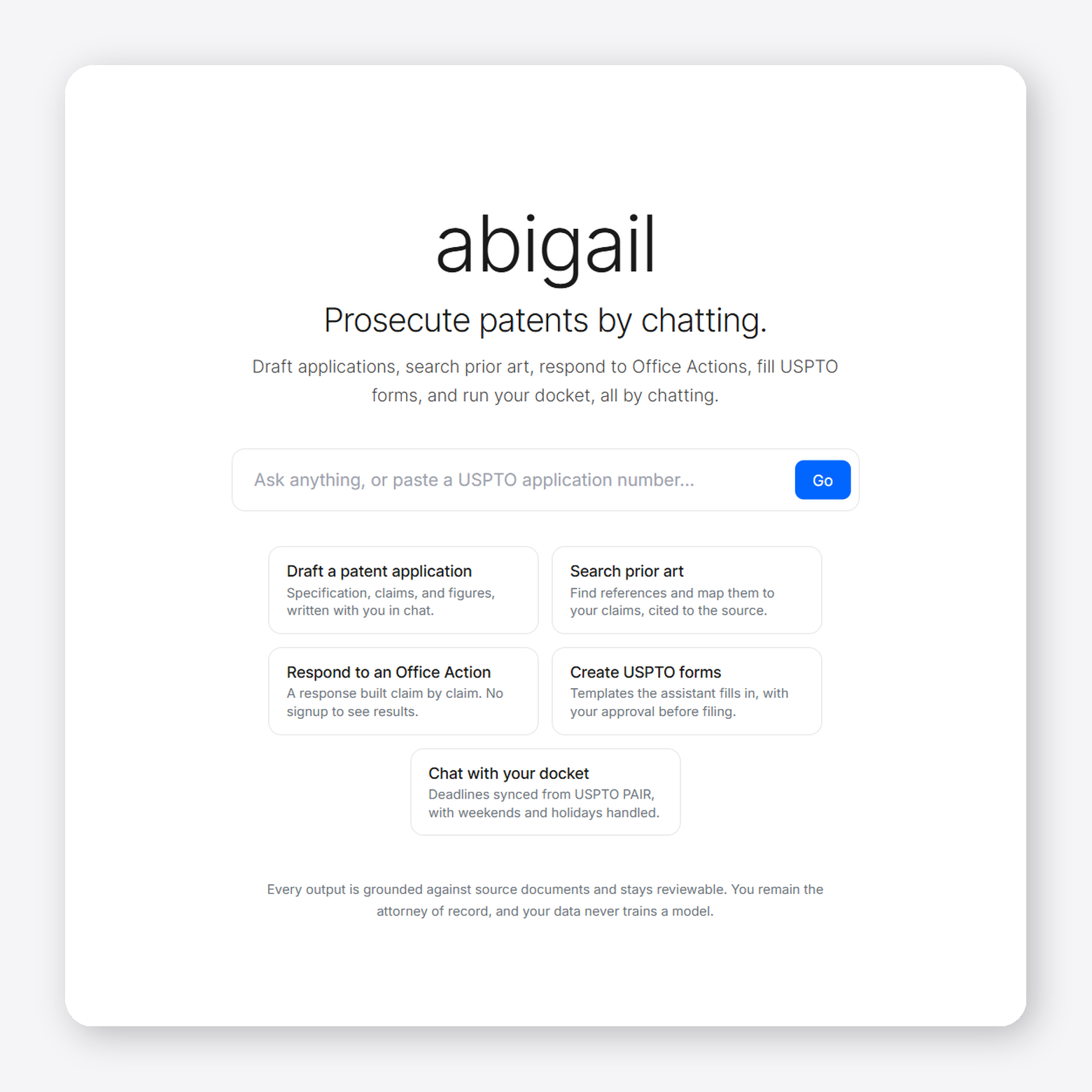
2. ABIGAIL: Best for Transactional, Pay-Per-Use Office Action Response Drafting

ABIGAIL is an AI patent prosecution platform for USPTO Office Action responses. It supports patent attorneys and IP teams that want AI assistance throughout the prosecution process. The platform also includes docketing, examiner analytics, and practice management capabilities.
Features
- Specialized AI experts: Uses dedicated AI models for different rejection types instead of a single general-purpose model.
- Prior art comparison: Maps claim limitations to examiner-cited references with side-by-side comparisons and confidence scoring.
- Response drafting: Generates editable, 37 CFR-compliant response drafts with source-linked explanations.
- Examiner analytics: Provides examiner allowance rates, prosecution trends, and historical examination patterns.
Pros
- Tracks active application deadlines, auto-calculates responses, and saves individual examiner historical data directly inside a unified dashboard.
Cons
- Operates entirely within browser interfaces instead of embedding local add-ins for programs like Microsoft Word.
- Specializes primarily in handling existing patent office action rejections rather than drafting initial invention applications.
Customer reviews: No customer review available
Pricing: Pay as you go, starting at $25
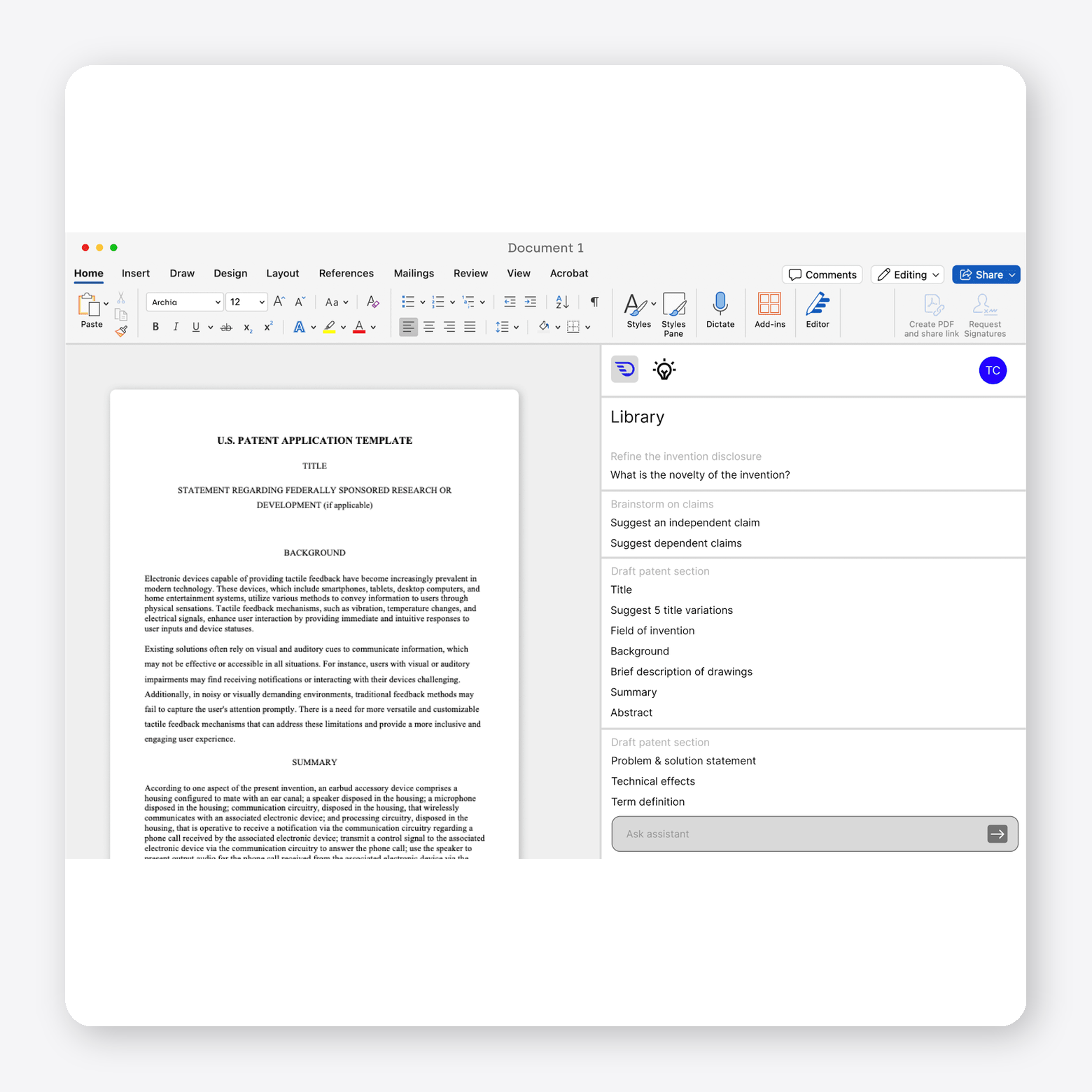
3. DeepIP: Best for patent drafting and prosecution directly inside Microsoft Word

DeepIP is an AI patent platform that supports patent drafting, prosecution, patentability analysis, prior art search, portfolio intelligence, and related IP workflows. It helps patent attorneys and law firms manage patent work from invention through prosecution within a single platform.
Features
- Patent prosecution: Analyzes Office Actions, supports amendment strategies, and generates prosecution arguments with cited case law.
- Patent drafting: Assists with drafting patent applications, claims, and specifications from invention disclosures.
- Agentic prior art search: Searches prior art and patent literature with iterative, context-aware queries.
- Patent review: Reviews applications for cross-references, claim consistency, and drafting issues before filing.
Pros
- Connects drafting, patentability analysis, and prosecution workflows in one system.
- Protects sensitive corporate data using isolated Azure-hosted AI models backed by enterprise SOC 2 compliance.
Cons:
- Requires integration into existing workflows to realize full value.
- Charges enterprise-level subscription pricing that remains out of reach for small boutique law firms.
Customer reviews
- Not available publicly
Pricing: Pricing not available
4. Solve Intelligence: Best for Chat-Guided Co-Drafting inside a Custom Browser Editor

Solve Intelligence is an AI patent platform for patent attorneys, law firms, and enterprise IP teams. It supports patent work across drafting, prosecution, claim charting, invention harvesting, and related patent workflows. The platform aims to help IP teams manage patent matters within a single AI-assisted environment.

Features
- Patent drafting: Generates full and partial patent applications while supporting different application types and drafting styles.
- AI prosecution analysis: Reviews examiner objections, prior art, and rejection strategies while suggesting amendments and response arguments.
- Claim chart generation: Creates invalidity, infringement, SEP, freedom-to-operate, and claim construction charts with citation-backed analysis.
- Invention harvesting: Generates and manages invention disclosure forms with customizable inventor questionnaires.
Pros
- Strong performance in life sciences and chemical arts that includes support for sequences and chemical structures
- Specification and flowchart generation that produces detailed outputs from minimal input
Cons:
- Chat-based prompting that can feel disjointed for practitioners who prefer more automated workflows
- Mechanical patent drafting required additional manual review and refinement
Customer reviews
- "We used Solve Intelligence for about a month and found it to be a highly useful tool, especially for computer-related inventions. We found the software less efficient when working on mechanical inventions. Preparing mechanical patent specifications required much more manual input." — Verified user, G2
Pricing: Estimated ~$775/user/month (~$9,300/year) based on promotional offers.
5. Patentext: Best for Startup Patent Filing and Strategy
Patentext is an AI patent platform for startups and growing companies that focuses on helping companies develop patent strategies before filing with the USPTO. It also operates a registered patent agency that prepares and files patent applications on behalf of clients.
Features
- Invention capture: Identifies potentially patentable ideas from collaboration and document management tools.
- Patent strategy: Organizes invention disclosures, prioritizes concepts, and tracks patent portfolios.
- AI-assisted drafting: Supports drafting patent applications before practitioner review and filing.
- Patent filing services: Provides flat-fee filing for provisional, non-provisional, PCT, continuation, and Office Action responses through registered patent agents.
Pros
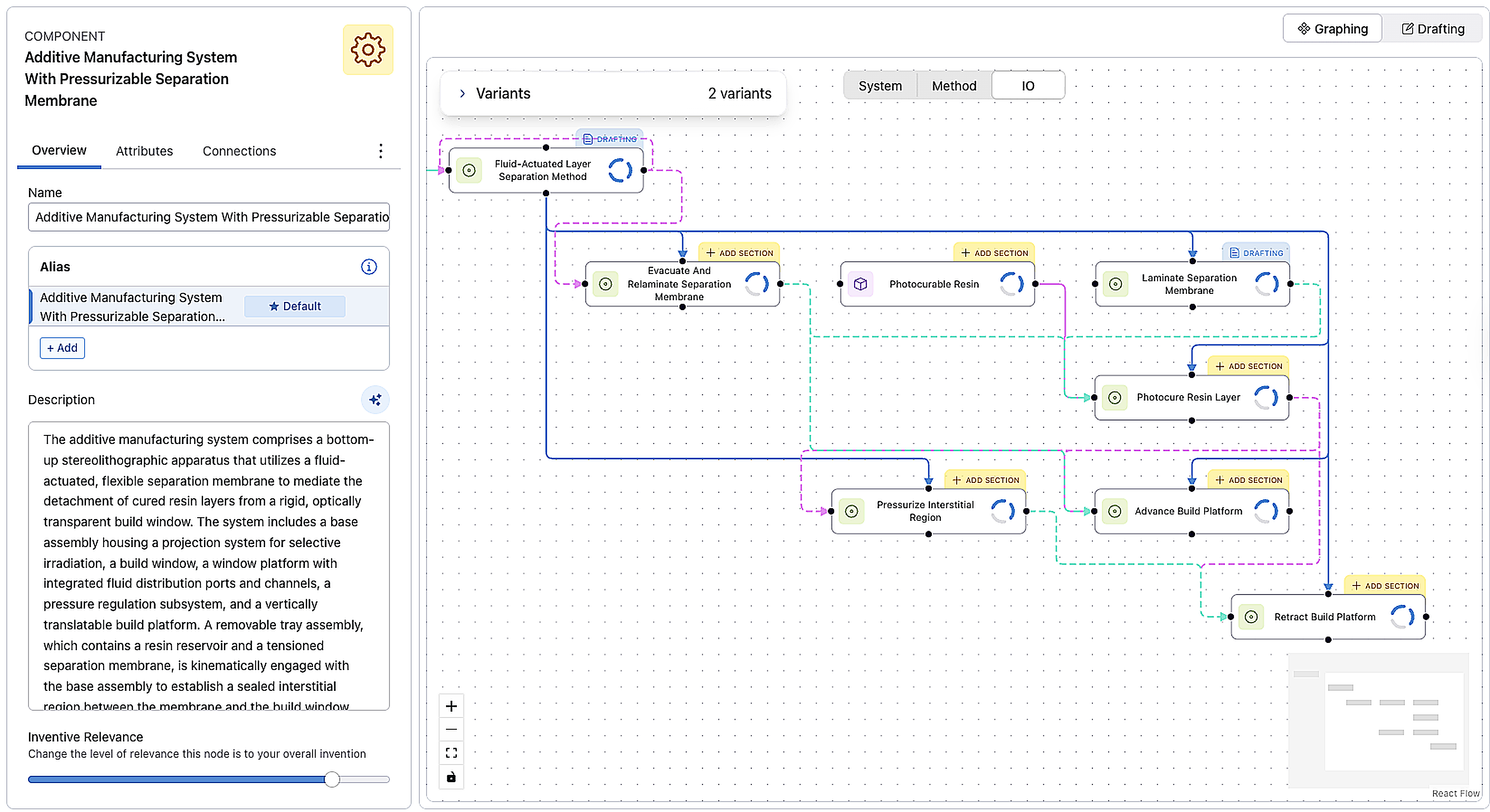
- Converts unstructured notes into an interactive visual graph of your invention.
- Charges fixed fees instead of unpredictable, billable hours.
Cons
- Forces your idea into predefined steps that lack standard legal flexibility.
- Requires detailed, organized technical notes upfront to generate accurate drafts.
Customer reviews: No User testimonial available
Pricing:
- Starter: Free
- Discovery: $30/month
- Strategist (coming soon): 150/month
What to Look for When Evaluating an Office Action Response Tool in 2026
All AI office action response tools offer different capabilities. Focus on capabilities that reduce manual work, support prosecution strategy, and fit your existing practice.
- Automatic prior art retrieval (not manual upload): Prioritize software that automatically retrieves cited references from patent databases. Manual uploads add extra steps and increase the risk of missing supporting documents.
- Rejection analysis depth: Evaluate how the software identifies rejections under 35 U.S.C. §§ 101, 102, 103, and 112. It should organize examiner arguments by claim and explain how each rejection applies.
- Examiner intelligence: Consider tools that provide examiner insights to support prosecution strategy. Useful data may include allowance rates, rejection patterns, cited art, and examination history.
- Claim amendment support: Confirm that the platform suggests amendment options with citations to the specification. This helps you evaluate changes while maintaining written description support.
- Multi-jurisdictional coverage: Determine whether the software supports the jurisdictions where you prosecute patents. Some tools focus on the USPTO, while others also cover the EPO, JPO, and additional patent offices.
- Data security and confidentiality: Verify that the platform protects confidential invention data. Look for enterprise security, access controls, audit logs, and transparent data handling policies.
- Workflow integration and export: Ensure the software fits your existing workflow. Export options and integrations with patent management systems can reduce manual document handling.
Why General AI Tools Are Risky for Action Office Responses
Accuracy remains the top concern when attorneys evaluate AI tools. Nearly 75% of attorneys cite accuracy as their primary concern when using AI in legal work.
That concern carries even more weight during patent prosecution. Office Action responses require attorneys to analyze the examiner's reasoning, distinguish the cited prior art, identify support in the specification, and present accurate legal and technical arguments. Errors or unsupported statements can affect prosecution strategy and the quality of the patent.
General-purpose AI tools are not built for these requirements. They may not retrieve the complete prosecution history, analyze claim limitations against cited references, or support arguments with citations to the specification, prior art, or relevant case law. Attorneys must also verify that any AI-generated content accurately reflects the record before relying on it.
The USPTO's duty of candor and good faith applies regardless of whether AI assists with drafting. Practitioners remain responsible for the accuracy of every submission and must ensure that responses comply with USPTO requirements.
Purpose-built office action response tools reduce these risks by grounding their analysis in prosecution documents, cited references, and the patent specification. They also keep attorneys in control of the final work product, allowing AI to support prosecution without replacing legal judgment.
Build Prosecution Efficiency That Compounds
Office Action responses require careful legal analysis, technical review, and strategic judgment. The right AI office action response tool should reduce manual work without compromising attorney oversight. It should help you understand examiner rejections, analyze cited prior art, develop response strategies, and prepare drafts grounded in the prosecution record.
When evaluating software, look for platforms that support the entire prosecution workflow rather than isolated tasks. Features such as automatic prior art retrieval, claim-to-reference mapping, citation-backed amendment suggestions, examiner intelligence, and enterprise-grade security can help reduce context switching while supporting consistent, defensible responses.
For teams that manage patent work beyond prosecution, Patlytics connects Office Action analysis with patent drafting, invalidity analysis, infringement detection, claim charting, and portfolio management in a single platform. That continuity allows attorneys and IP teams to move between related workflows without leaving the platform or duplicating work.
Office Action Response Tool FAQs
What is an office action response tool?
An office action response tool helps patent attorneys analyze and respond to patent examiner rejections. AI-powered tools can parse office actions, retrieve cited prior art, map claims to references, generate draft arguments, and assemble response documents for attorney review.
What is the difference between an AI office action tool and a patent drafting tool?
An AI office action tool supports patent prosecution after an examiner issues an office action. It analyzes rejections, reviews cited prior art, suggests arguments or amendments, and helps prepare a response. A patent drafting tool supports an earlier stage of the process by generating claims and specifications from an invention disclosure before the application is filed.
What rejection types can an AI office action tool handle?
Most AI office action tools can analyze rejections under 35 U.S.C. §§ 101, 102, 103, and 112. Some platforms also support restriction requirements, double patenting rejections, and other prosecution issues, depending on their capabilities.
How long does an office action response take with AI assistance?
The time varies based on the complexity of the office action and the prosecution strategy. AI can reduce the time spent reviewing examiner arguments, analyzing prior art, and preparing a draft response, but attorneys still need to review the analysis, make strategic decisions, and finalize the response before filing.
Is AI-assisted office action response compliant with USPTO requirements?
Yes, provided attorneys use AI appropriately and review the final work product before filing. AI can assist with analyzing office actions and drafting responses, but practitioners remain responsible for the accuracy of the submission and compliance with USPTO requirements, including the duty of candor.
AI Office Action Response Tools: What Patent Attorneys Should Actually Look For
Office action responses involve more than drafting. Patent attorneys must interpret rejections, analyze cited prior art, and develop a response strategy. The best AI office action response tools reduce manual analysis while allowing attorneys to retain control over legal judgment.
Global patent applications reached 3.7 million in 2024, a 4.9% increase over the previous year, according to WIPO. As filing volume grows, patent attorneys spend more time reviewing examiner reasoning, mapping claims to cited references, and identifying specification support before drafting begins.
This guide explains how AI office action response tools work. It compares the leading platforms and outlines the capabilities that matter most during software evaluation.
Key Takeaways
- AI office action response tools automate tasks such as rejection analysis, prior art retrieval, claim mapping, and response drafting.
- The best platforms support attorney review with citation-backed arguments and specification references rather than replacing legal judgment.
- Specialized patent AI platforms generally provide more reliable prosecution support than general-purpose AI tools.
- Office action response tools vary in scope, with some focusing on prosecution and others supporting the broader patent lifecycle.
What Does an Office Action Response Tool Do?
An AI office action response tool helps patent attorneys analyze and respond to patent examiner rejections. It automates much of the manual work before drafting begins, including parsing office actions, retrieving cited prior art, mapping claims, and preparing a response draft for attorney review.
Step 1: OA Parsing
The software ingests the office action PDF and identifies each rejection under 35 U.S.C. §§ 101, 102, 103, and 112. It extracts the examiner's arguments and links them to the relevant claims.
Step 2: Prior Art Retrieval
Next, it retrieves the cited references from the USPTO and other patent databases. It also highlights the passages the examiner relied on for each rejection.
Step 3: Claim-to-reference Mapping
Each claim limitation is mapped against the cited references. This analysis shows where the examiner identified a teaching and where the cited art may not support the rejection.
Step 4: Argument and Amendment Suggestions
Based on the analysis, the software generates draft arguments that distinguish the claims from the cited prior art. It also identifies amendment options and cites supporting passages from the specification.
Step 5: Response Document Assembly
Finally, it assembles a draft response with remarks, claim amendments, and an updated claim listing. The document follows applicable 37 CFR requirements and is ready for attorney review and revision.
Leading AI Office Action Response Tools in 2026
AI office action response tools vary in scope and functionality. Some focus on prosecution workflows, while others combine office action analysis with drafting, search, and broader patent lifecycle management. The platforms below compare their core capabilities, strengths, and tradeoffs for patent attorneys and in-house IP teams.
1. Patlytics: Best For End-To-End Patent Lifecycle Management
Patlytics is an AI-native patent platform that supports the entire patent lifecycle, from invention disclosure and drafting to prosecution, invalidity analysis, infringement detection, and portfolio management.
The platform is built to reduce repetitive work while improving the quality and usability of the output. Teams can move from source materials to structured drafts, analyze prior art, generate claim charts, and evaluate portfolio assets without switching systems or losing context. That makes it easier to move faster across high-volume work while keeping attorney review and judgment central.
Patlytics is trusted by large law firms and enterprise teams, including over 40% of Am Law 100 firms and Fortune 500. It is the only platform on the market combining drafting, prosecution, infringement, invalidity, FTO, SEP, and portfolio analysis in one system.
Features
- AI-powered office action analysis: Retrieves office action materials, analyzes examiner rejections, recommends response strategies, and drafts responses with a contextual AI agent.
- Patent application drafting: Generates applications from invention disclosures, technical documents, figures, and other source materials.
- Invalidity analysis: Combines prior art search, §§ 102, 103, and 112 analysis, and citation-backed claim charting in one workflow.
- Infringement detection: Identifies evidence of use, generates limitation-by-limitation claim charts, and analyzes portfolios at scale.
- Connected patent workflows: Moves seamlessly between drafting, prosecution, search, invalidity, FTO, and portfolio analysis within one platform.
- Enterprise security: SOC 2 Type II, ISO 27001, ISO 42001, and GDPR compliant. Customer data is encrypted, segregated, and never used to train AI models.
Pros
- User-friendly interface that delivers accurate, reliable outputs across key patent categories
- Single platform that covers drafting, analysis, infringement detection, and portfolio management without switching tools
- Responsive customer support that users consistently describe as trustworthy and attentive
Cons:
- Built for teams whose work spans multiple IP workflows, solo practitioners with a single narrow focus may prefer a point tool
Customer reviews
- "Patlytics is easy to use, understand, and helps our team see issues that they would normally miss. The Patlytics team and customer service is top notch and gives us the trust that we need in a product this important to our bottom line." — Verified user, G2
Pricing: Custom pricing
Book a demo with Patlytics today
2. ABIGAIL: Best for Transactional, Pay-Per-Use Office Action Response Drafting
ABIGAIL is an AI patent prosecution platform for USPTO Office Action responses. It supports patent attorneys and IP teams that want AI assistance throughout the prosecution process. The platform also includes docketing, examiner analytics, and practice management capabilities.
Features
- Specialized AI experts: Uses dedicated AI models for different rejection types instead of a single general-purpose model.
- Prior art comparison: Maps claim limitations to examiner-cited references with side-by-side comparisons and confidence scoring.
- Response drafting: Generates editable, 37 CFR-compliant response drafts with source-linked explanations.
- Examiner analytics: Provides examiner allowance rates, prosecution trends, and historical examination patterns.
Pros
- Tracks active application deadlines, auto-calculates responses, and saves individual examiner historical data directly inside a unified dashboard.
Cons
- Operates entirely within browser interfaces instead of embedding local add-ins for programs like Microsoft Word.
- Specializes primarily in handling existing patent office action rejections rather than drafting initial invention applications.
Customer reviews: No customer review available
Pricing: Pay as you go, starting at $25
3. DeepIP: Best for patent drafting and prosecution directly inside Microsoft Word
DeepIP is an AI patent platform that supports patent drafting, prosecution, patentability analysis, prior art search, portfolio intelligence, and related IP workflows. It helps patent attorneys and law firms manage patent work from invention through prosecution within a single platform.
Features
- Patent prosecution: Analyzes Office Actions, supports amendment strategies, and generates prosecution arguments with cited case law.
- Patent drafting: Assists with drafting patent applications, claims, and specifications from invention disclosures.
- Agentic prior art search: Searches prior art and patent literature with iterative, context-aware queries.
- Patent review: Reviews applications for cross-references, claim consistency, and drafting issues before filing.
Pros
- Connects drafting, patentability analysis, and prosecution workflows in one system.
- Protects sensitive corporate data using isolated Azure-hosted AI models backed by enterprise SOC 2 compliance.
Cons:
- Requires integration into existing workflows to realize full value.
- Charges enterprise-level subscription pricing that remains out of reach for small boutique law firms.
Customer reviews
- Not available publicly
Pricing: Pricing not available
4. Solve Intelligence: Best for Chat-Guided Co-Drafting inside a Custom Browser Editor
Solve Intelligence is an AI patent platform for patent attorneys, law firms, and enterprise IP teams. It supports patent work across drafting, prosecution, claim charting, invention harvesting, and related patent workflows. The platform aims to help IP teams manage patent matters within a single AI-assisted environment.
Features
- Patent drafting: Generates full and partial patent applications while supporting different application types and drafting styles.
- AI prosecution analysis: Reviews examiner objections, prior art, and rejection strategies while suggesting amendments and response arguments.
- Claim chart generation: Creates invalidity, infringement, SEP, freedom-to-operate, and claim construction charts with citation-backed analysis.
- Invention harvesting: Generates and manages invention disclosure forms with customizable inventor questionnaires.
Pros
- Strong performance in life sciences and chemical arts that includes support for sequences and chemical structures
- Specification and flowchart generation that produces detailed outputs from minimal input
Cons:
- Chat-based prompting that can feel disjointed for practitioners who prefer more automated workflows
- Mechanical patent drafting required additional manual review and refinement
Customer reviews
- "We used Solve Intelligence for about a month and found it to be a highly useful tool, especially for computer-related inventions. We found the software less efficient when working on mechanical inventions. Preparing mechanical patent specifications required much more manual input." — Verified user, G2
Pricing: Estimated ~$775/user/month (~$9,300/year) based on promotional offers.
5. Patentext: Best for Startup Patent Filing and Strategy
Patentext is an AI patent platform for startups and growing companies that focuses on helping companies develop patent strategies before filing with the USPTO. It also operates a registered patent agency that prepares and files patent applications on behalf of clients.
Features
- Invention capture: Identifies potentially patentable ideas from collaboration and document management tools.
- Patent strategy: Organizes invention disclosures, prioritizes concepts, and tracks patent portfolios.
- AI-assisted drafting: Supports drafting patent applications before practitioner review and filing.
- Patent filing services: Provides flat-fee filing for provisional, non-provisional, PCT, continuation, and Office Action responses through registered patent agents.
Pros
- Converts unstructured notes into an interactive visual graph of your invention.
- Charges fixed fees instead of unpredictable, billable hours.
Cons
- Forces your idea into predefined steps that lack standard legal flexibility.
- Requires detailed, organized technical notes upfront to generate accurate drafts.
Customer reviews: No User testimonial available
Pricing:
- Starter: Free
- Discovery: $30/month
- Strategist (coming soon): 150/month
What to Look for When Evaluating an Office Action Response Tool in 2026
All AI office action response tools offer different capabilities. Focus on capabilities that reduce manual work, support prosecution strategy, and fit your existing practice.
- Automatic prior art retrieval (not manual upload): Prioritize software that automatically retrieves cited references from patent databases. Manual uploads add extra steps and increase the risk of missing supporting documents.
- Rejection analysis depth: Evaluate how the software identifies rejections under 35 U.S.C. §§ 101, 102, 103, and 112. It should organize examiner arguments by claim and explain how each rejection applies.
- Examiner intelligence: Consider tools that provide examiner insights to support prosecution strategy. Useful data may include allowance rates, rejection patterns, cited art, and examination history.
- Claim amendment support: Confirm that the platform suggests amendment options with citations to the specification. This helps you evaluate changes while maintaining written description support.
- Multi-jurisdictional coverage: Determine whether the software supports the jurisdictions where you prosecute patents. Some tools focus on the USPTO, while others also cover the EPO, JPO, and additional patent offices.
- Data security and confidentiality: Verify that the platform protects confidential invention data. Look for enterprise security, access controls, audit logs, and transparent data handling policies.
- Workflow integration and export: Ensure the software fits your existing workflow. Export options and integrations with patent management systems can reduce manual document handling.
Why General AI Tools Are Risky for Action Office Responses
Accuracy remains the top concern when attorneys evaluate AI tools. Nearly 75% of attorneys cite accuracy as their primary concern when using AI in legal work.
That concern carries even more weight during patent prosecution. Office Action responses require attorneys to analyze the examiner's reasoning, distinguish the cited prior art, identify support in the specification, and present accurate legal and technical arguments. Errors or unsupported statements can affect prosecution strategy and the quality of the patent.
General-purpose AI tools are not built for these requirements. They may not retrieve the complete prosecution history, analyze claim limitations against cited references, or support arguments with citations to the specification, prior art, or relevant case law. Attorneys must also verify that any AI-generated content accurately reflects the record before relying on it.
The USPTO's duty of candor and good faith applies regardless of whether AI assists with drafting. Practitioners remain responsible for the accuracy of every submission and must ensure that responses comply with USPTO requirements.
Purpose-built office action response tools reduce these risks by grounding their analysis in prosecution documents, cited references, and the patent specification. They also keep attorneys in control of the final work product, allowing AI to support prosecution without replacing legal judgment.
Build Prosecution Efficiency That Compounds
Office Action responses require careful legal analysis, technical review, and strategic judgment. The right AI office action response tool should reduce manual work without compromising attorney oversight. It should help you understand examiner rejections, analyze cited prior art, develop response strategies, and prepare drafts grounded in the prosecution record.
When evaluating software, look for platforms that support the entire prosecution workflow rather than isolated tasks. Features such as automatic prior art retrieval, claim-to-reference mapping, citation-backed amendment suggestions, examiner intelligence, and enterprise-grade security can help reduce context switching while supporting consistent, defensible responses.
For teams that manage patent work beyond prosecution, Patlytics connects Office Action analysis with patent drafting, invalidity analysis, infringement detection, claim charting, and portfolio management in a single platform. That continuity allows attorneys and IP teams to move between related workflows without leaving the platform or duplicating work.
Office Action Response Tool FAQs
What is an office action response tool?
An office action response tool helps patent attorneys analyze and respond to patent examiner rejections. AI-powered tools can parse office actions, retrieve cited prior art, map claims to references, generate draft arguments, and assemble response documents for attorney review.
What is the difference between an AI office action tool and a patent drafting tool?
An AI office action tool supports patent prosecution after an examiner issues an office action. It analyzes rejections, reviews cited prior art, suggests arguments or amendments, and helps prepare a response. A patent drafting tool supports an earlier stage of the process by generating claims and specifications from an invention disclosure before the application is filed.
What rejection types can an AI office action tool handle?
Most AI office action tools can analyze rejections under 35 U.S.C. §§ 101, 102, 103, and 112. Some platforms also support restriction requirements, double patenting rejections, and other prosecution issues, depending on their capabilities.
How long does an office action response take with AI assistance?
The time varies based on the complexity of the office action and the prosecution strategy. AI can reduce the time spent reviewing examiner arguments, analyzing prior art, and preparing a draft response, but attorneys still need to review the analysis, make strategic decisions, and finalize the response before filing.
Is AI-assisted office action response compliant with USPTO requirements?
Yes, provided attorneys use AI appropriately and review the final work product before filing. AI can assist with analyzing office actions and drafting responses, but practitioners remain responsible for the accuracy of the submission and compliance with USPTO requirements, including the duty of candor.
The Premier AI-Powered Patent Platform
Reduce cycle times. Increase margins. Deliver winning IP outcomes.
Book a DemoThe Premier AI-Powered
Patent Platform
Reduce cycle times. Increase margins. Deliver winning IP outcomes.